WLINK recently launched Wi-Fi hotspot firmware for its range of mobile routers, targeting in particular the public transportation industry.
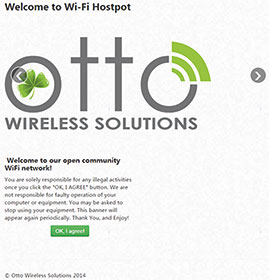
The firmware allows for operators to upload advertising media onto the router so that when a user connects to the hotspot they are presented with a landing page displaying that media content. Once users accept the terms
and conditions on the landing page they are redirected to the operator’s webpage and provided with full Internet connectivity. An advanced firewall feature complements user connectivity as IP, MAC, domain, port and keyword filtering can be managed locally by an operator or remotely via a control room.
The actual process of using the router with this firmware and customising the landing page is quite simple: a SIM card is inserted, GSM and Wi-Fi antennas connected, then the router is powered on and connected to from a PC via a LAN cable in order to access the device as an administrator. Once the user has access to the router, the APN needs to be set up correctly, and the Wi-Fi network name and password, as chosen by the administrator, are selected in the ‘WLAN / Basic Settings’ menu.
Up to this point, everything is very much the same as setting up a basic router for home use. The first ‘advanced’ setup is the customisation of the landing / splash page. This is achieved by editing an html file, which includes customisation of graphics as well as an editable blurb for terms and conditions of use.
In order to maintain network quality for connected Wi-Fi clients, the administrator then has the ability to set limits on logged time, idle time, as well as download and upload speeds. Since the firmware is designed specifically for unlimited free use for the public transport sector, there is no option to switch to a paid data model once limits have been reached.
In line with other advanced functions which WLINK offers, the bus / taxi firmware carries no additional charges, and can be supported on a variety of the company’s devices. When ordering hardware, one simply has to ensure that the appropriate firmware has been specified.
Simplifying system design iCorp Technologies
Telecoms, Datacoms, Wireless, IoT
The FGMC63N tri-band MCU Wi-Fi 6E module from Quectel addresses offers integrated connectivity across 2,4 GHz, 5 GHz, and 6 GHz bands in a compact, highly optimised design.
Read more...Dragino’s connectivity catalogue Otto Wireless Solutions
Telecoms, Datacoms, Wireless, IoT
Where Wi-Fi demands frequent charging and covers tens of meters, and traditional cellular consumes too much power for battery-operated nodes, LoRaWAN threads the needle.
Read more...RF filters explained RFiber Solutions
Telecoms, Datacoms, Wireless, IoT
As RF environments become increasingly crowded, RF filters play a critical role in maintaining signal quality, improving system performance, and ensuring reliable operation.
Read more...Practical design strategies for 5G RF Design
Telecoms, Datacoms, Wireless, IoT
The Cavli CQM211 aims to provide a platform that combines strong 5G connectivity with onboard compute capability, as well as interface flexibility that suits both new designs and rapid migrations from earlier products.
Read more...An industry-first Android 16 smart module solution RF Design
Computer/Embedded Technology Telecoms, Datacoms, Wireless, IoT
The MeiG Smart SLM580 4G Smart Module features native support for Android 16 and covers core frequency bands in major countries and regions worldwide.
Read more...High performance RF signal conditioning RFiber Solutions
Telecoms, Datacoms, Wireless, IoT
The AM3269 from Mercury Systems is a high-performance RF preselector module designed to improve receiver sensitivity and signal integrity in demanding electronic warfare, signals intelligence, test, and communications applications.
Read more...RF filters explained RFiber Solutions
Telecoms, Datacoms, Wireless, IoT
As RF environments become increasingly crowded, RF filters play a critical role in maintaining signal quality, improving system performance, and ensuring reliable operation.
Read more...Industrial connectivity without compromise
Telecoms, Datacoms, Wireless, IoT
The IR315 combines 4G LTE, Wi-Fi, Ethernet, and VPN technologies into a rugged, industrial-grade platform that enables seamless connectivity across a wide range of applications.
While every effort has been made to ensure the accuracy of the information contained herein, the publisher and its agents cannot be held responsible for any errors contained, or any loss incurred as a result. Articles published do not necessarily reflect the views of the publishers. The editor reserves the right to alter or cut copy. Articles submitted are deemed to have been cleared for publication. Advertisements and company contact details are published as provided by the advertiser. Technews Publishing (Pty) Ltd cannot be held responsible for the accuracy or veracity of supplied material.









 printer friendly version