


We are all familiar with the behaviour of a desktop PC running Windows XP with respect to applying power to and shutting down the system. Modern desktop PCs use an ATX-compatible power supply that applies intelligence to the power-on/off behaviour.
These systems have essentially two power control switches. The power supply itself has a master switch that controls whether the power supply itself is 'on' or 'off'. Yet the power supply can also be controlled with software. When you execute a shutdown from Windows XP, the operating system sends a command to the power supply to shut off. The power supply's power switch remains in the on-position. The system is then turned back on by pressing a 'power-on' button, usually on the front of the system. Pressing the power button tells the system to send a command to the power supply to turn on and the system boots.
For the purposes of this discussion, several terms will be defined below:
* The switch on the power supply itself will be called the 'main power switch.'
* The button on the front of the system that is usually used to turn the system on will be called the 'power button.'
* When the main power supply is on, but the system is off (which occurs after an OS-initiated shutdown), the system is in a mode we shall call 'standby.' In this mode, the power supply provides a small amount of current to power a portion of the system to be able to respond to the power button when it is pressed.
* A shutdown executed in the operating system will be called a 'soft-off'. Note that a soft-off can also be achieved by holding the power button down for at least four seconds. A soft-off is only attainable with an ATX style power supply. With an AT-style power supply, the OS may shut down, but the power supply itself remains on. The OS may display information that it has completed its shutdown sequence and that it is OK to remove power to the system by turning off the main power switch on the supply itself.
* A shutdown executed by turning off the main power switch or unplugging the power supply from the wall will be called a 'hard-off'. In this event, the main power switch must be turned on or plugged into the wall before the power button can be used to turn on the system to boot.
Power-on behaviour comes into question when the system is initiated from a hard-off state. There are essentially two choices. When the master power switch is turned on (or in the event of no master power switch, when the power cord is plugged into the wall), does the system boot immediately, or does the system enter standby state and wait for the power button to be pressed? There appears to be no standard with respect to this behaviour. A recent sampling of a dozen or so desktop systems from a variety of manufacturers demonstrated both sets of behaviour.
How does all this apply in an embedded system?
Many embedded systems are on 24/7, and never turned off. In this case, this behaviour is only important the first time the system is turned on, or in the event of a power failure. Many other embedded systems have no tolerance for the multiple power switch methodology familiar in desktop PCs. These systems want a single, simple ON/OFF switch. Setting the switch to ON boots the system. Setting the switch to OFF turns the system off. The concept of soft-off does not apply. Other embedded systems may want to utilise the soft-off feature and operate in a manner similar to desktop or laptop PCs.
An example of how this applies in embedded systems is an information kiosk in a hotel lobby. The screen displayed the dialogue box with the familiar Windows shutdown options (Log Off, Restart and Shutdown). Yet there is no power button accessible outside the enclosure. If this system were to shutdown, there is no way to turn it back on from the outside of the enclosure. A service call would be required to have a service technician open the enclosure and restart the system. In the event of a power failure, this unattended system would not boot and would require a service call to start system operation.
Three situations
The three potential models for embedded system power-on behaviour and the requirements placed on the system are defined in Table 1.
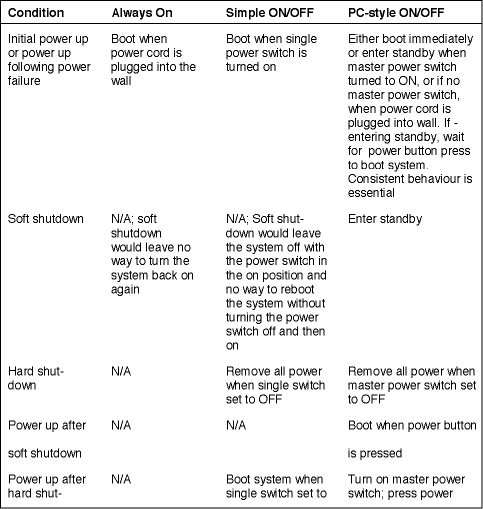
In a robust system environment, the behaviour of the first two models should operate correctly whether an AT-style or ATX-style power supply is used. In the third model, an ATX-style power supply is required to support the soft-off mode.
In the second model, the operating system software will need to be robust enough to recover from a shutdown in any stage of operation or provide guidance to the user regarding when it is OK to turn off the power.
In the third model, the operating system software will need to offer the user the option to shut down the system and provide the drivers necessary to control the power supply.
In order to support models 1 and 2 with both AT-style and ATX-style power supplies, and to support the option for either immediate boot or to enter standby on initial power-on for model 3, it is imperative that the system BIOS be able to configure the hardware for either immediate boot or for entering standby.
Ampro is adding such a set-up parameter to its embedded BIOS for its single board computers and embedded modules. The default factory setting for this parameter in all cases is to boot immediately. This setting allows model number 1 and model number 2 to work correctly with either an AT-style or ATX-style power supply.
Note that different boards may behave differently the very first time power is applied - which usually occurs during production test. Ampro has found that boards implemented with the 'Via Twister T' chipset will enter standby when they are first powered on. Boards implemented with the 'Intel 855GME' chipset will boot when they are first powered on. After the initial power-on, the behaviour is completely controlled by the BIOS setting.
Once the CMOS settings take hold, the system will follow the parameters set into the BIOS. Ampro's battery-free boot feature in its embedded BIOS assures that the setting will not be lost in the event of a battery failure. The system will continue to behave properly.
For systems that wish to follow model number three's behaviour, designers simply need to change the CMOS setting in BIOS set-up to indicate that the system should enter standby on power up.
Ampro's BIOS implementation provides complete flexibility to the embedded developer to control the power-on behaviour of his/her systems design. This represents another example of how embedded systems differ from our desktop and laptop systems and how specific features are necessary to make embedded PC boards and modules meet the needs of the embedded marketplace.
For more information contact Jaap Willemse, Electronic Products Design, +27 (0)12 665 9700.
| Tel: | +27 12 493 0852 |
| Email: | jaapwillemse@gmail.com |
| www: | www.epd.co.za |
| Articles: | More information and articles about Electronic Products Design |






© Technews Publishing (Pty) Ltd | All Rights Reserved
 printer friendly version