


Q: What is 98% of 8 billion?
A: One heck of a huge number.
It is also a conservative estimate of the number of microprocessors sold this year into the embedded systems market. The wireless segment of that market is in its infancy, with vast growth potential projected for the next 10 years. That, dear reader, is called an opportunity. This document will help you take advantage of this opportunity by covering the important design questions and guidelines that lead to a successful embedded wireless application.
Design guidelines
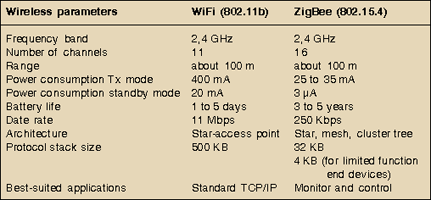
When designing with a wireless Rabbit from Rabbit Semiconductor, or any wireless device for that matter, you need to understand the requirements of your application and the ability of each of the wireless protocols to meet those requirements. By reading the information in Table 1 and answering the following questions you will gain awareness of how best to incorporate wireless into your embedded design.
How do you choose between WiFi and ZigBee?
The wireless protocol to use depends on the requirements of your application. The following table compares the specifications of WiFi and ZigBee in regards to some general wireless parameters. It supplies some of the numbers, but you, the engineer, need to supply the rest. Your particular application and its operating environment will determine which parameters are most important.

How much power does your wireless application need?
Too big of an appetite for power is a concern in many embedded devices. As you can see in Table 1, power consumption varies greatly between WiFi and ZigBee, both when transmitting and when in standby mode. ZigBee is designed for low-power applications, eg, battery-powered sensor nodes. Typically, controls and sensors do not require high bandwidth, but need low latency and low power consumption.
How fast does your wireless application need to transfer data?
How fast is fast enough? If your application requires fast data throughput, you need WiFi. It offers very high data rates: up to 11 Mbps (for 802.11b) and the longest range (100 m or higher with a directional antenna). By contrast, ZigBee trades higher data rates for lower power consumption.
What are some of the considerations when choosing a topology?
The network topology determines the choice of communication paths between nodes.
Some other considerations when choosing a topology are:
* Distances that a signal needs to travel.
* Future growth of the network.
* Reliability.
Do you need mesh?
According to the Metcalfe Law: "The value of a network increases as its number of connection points increases." The ad-hoc quality of a mesh network makes increasing the number of connection points, or nodes, very easy to do.
A mesh network has many attractive qualities. It is more reliable than other network architectures. If one node goes down, another can take its place. You can install repeater nodes to increase the transmission range and the nodes themselves figure out the best message delivery route to take, making for an efficient and self-healing system. Wireless mesh networks enable non-line-of-sight transmission, basically allowing the nodes to see around corners and cement walls.
The ZigBee-capable modules support mesh networking. Currently, the WiFi-capable modules do not support mesh networking.
What do you need to know about the wireless radio?
One thing you need to know is that there is tight integration of the radio module with the Rabbit and its hardware and software components. This integration allows you to focus on your application instead of the inevitable issues that arise when components from different manufacturers are brought together.
The diverse range of wireless applications has certain things in common. They each require three things: a transmitter with antenna, a receiver with antenna, and a transmission path between them. Table 2 compares the strength of the transmitter and the sensitivity of the receiver with WiFi- and ZigBee-capable modules.
What do you need to know about the antenna?
Deciding which antenna is right for your wireless application is largely a function of the physical environment in which it will be placed. It is important to identify any obstacle or interference between the transmitter's antenna and the receiver's antenna. To optimise the RF signal radiated between these two antennas requires a clear RF line-of-sight (LOS) path. An RF LOS is called a Fresnel zone, which is a football-shaped tunnel between the two antennas. In practical terms this means that antennas mounted at ground level will have half of the Fresnel zone blocked, which will decrease the communication range.
Antenna gain is another important characteristic affecting communication range. To understand gain, consider the difference between a naked light bulb and a flashlight. The flashlight has more gain than the naked light bulb because of the way it focuses the beam. In a wireless radio, the antenna of the transmitter increases gain by directing the signal more precisely towards the receiver, which creates a more acute angle of coverage. The antenna of the receiver increases gain by focusing the direction in which it 'listens'.
The physical environment of your wireless system includes the enclosure of the RF module you are using. The use of metal enclosures is strongly discouraged. In fact, mounting considerations include the admonition to stay far away from metal objects in general.
What types of enclosures can be used with a wireless device?
With an onboard antenna, the module needs to be out in the open or in some sort of plastic case. A metal case is NOT recommended. When using a module with an external antenna, the requirements for an enclosure are the same as for a wired module.
Does the absence of wires mean the device can be anywhere?
The physical location of your network and its nodes needs careful consideration. Signals travelling through the air lose strength when encountering natural and man-made obstacles and interference. Obstacles would include such things as: air humidity, building materials, and metal film sun-screened windows. Interference can come from microwave ovens or even other networks running on the same frequency band. The location of your network should be surveyed with an eye towards identifying obstacles and potential sources of interference.
Do you need web browser control in your application?
If you want the wireless device to host a web page, you will need a WiFi-capable module. The WiFi-capable module runs a TCP/IP stack over the wireless channel, while currently the ZigBee module does not support TCP/IP networking.
Summary
Wireless solutions open up possibilities that are not feasible with a wired solution. New locations are now accessible; sensors, previously shackled, can suddenly run free. As this vast market opens up, WiFi and ZigBee are well-positioned to meet the growing demand for wireless applications.






© Technews Publishing (Pty) Ltd | All Rights Reserved
 printer friendly version