


As a wireless supplier, Otto Wireless Solutions is very often drawn into assisting clients when it comes to integrating our routers into final products.
There are a few common questions we get asked, which has prompted us to include some non-wireless products in our portfolio, specifically for those occasions when customers are looking for a one-stop shop.
A common question we get asked is: “How do I use a router to switch 220 V devices on and off?”
The answer to this is surprisingly simple. Firstly, most routers on their own would not be able to deliver this sort of solution. There are a few products which incorporate a router as well as analog switching capabilities in the way of relays, but those products tend to be rather niche, and generally carry a heavy price-tag.
There is a simpler, less expensive way to accomplish this with a generic approach. When you combine any one of our industrial Wlink routers with a relay controller, it’s a whole new ball game, and one which everyone can play.
Let’s begin by giving you the basic specifications of the relay controller we selected, so you can get an idea of the sort of end-devices it can switch.
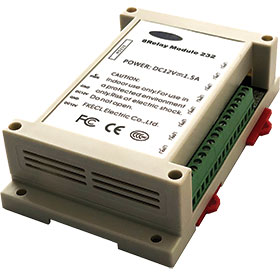
The relay controller module has an RS-232 interface and includes eight relays, each designed to function independently, packaged in a plastic enclosure, with a total weight of approximately 250 g. The relay module is powered at 12 V d.c./ 1,5 A. This relay module is used to switch any connected devices on and off.
When used in conjunction with a Wlink router, this relay can be used to switch devices remotely. This is achieved by simply enabling the TCP/IP protocol on the router and downloading a TCP/IP application on your mobile device. Alternatively, a virtual interface, for example Putty, can be used on a computer connected to the router if remote operation is not desired.
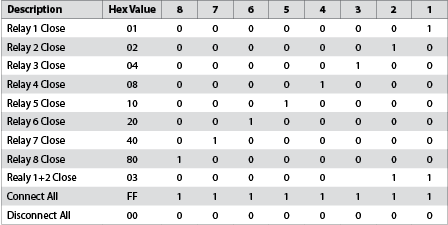
Each relay switch has a power capacity of 250 V a.c./ 10 A or 30 V d.c./ 10 A. The relay module can be mounted on a wall using DIN-rail clips if desired, or one can simply use the wall-mount screw sockets and mount the router to a wall or a sidewall of an enclosure. Each relay is represented by 1 bit, and the 8 bits are then converted to a hexadecimal value. A relay would then be assigned two unique hex commands – one would be used to open the relay and the other would close it.
There are two ways of connecting the relay to the router accomplishing the switching on and off functionality. The first method, as shown in Figure 1, will require the user to download a TCP/IP application on their smartphone and set up a TCP/IP tunnel on the router. This method is reliant on the stability of the network provider in use. The advantage of this method is that you can operate the relays remotely.
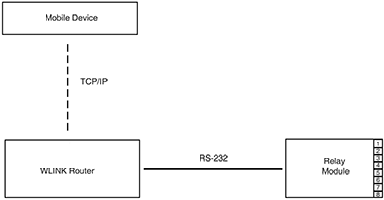
An alternative way of connecting the relay module to the router would be as in Figure 2. This is a more localised connection. This connection will require the user to install a virtual terminal (eg. Putty) on the computer. It is recommended that the user creates hexadecimal scripts as in Figure 3, to aid in recording and documenting the commands for ease of reference.

Taking control is a lot simpler than one would have imagined. This solution could be your answer to a useful application such as switching lights, generators, pumps, gates and more on and off, or it can even be scaled up to a bigger application like control of motors and other industrial machines. If you would like to know more about these products, or require further details about the configuration and setup, contact Otto Wireless Solutions as per below.
For more information contact Siphiwe Mashinini, Otto Wireless Solutions, +27 11 791 1033, siphiwe@otto.co.za, www.otto.co.za
| Tel: | +27 11 791 1033 |
| Email: | wireless@otto.co.za |
| www: | www.otto.co.za |
| Articles: | More information and articles about Otto Wireless Solutions |






© Technews Publishing (Pty) Ltd | All Rights Reserved
 printer friendly version