


Rigid system roles are used in the USB protocol to maintain order. One processor acts as the host and this issues commands to the device, which responds to the host’s commands. This works well where there is one central processor controlling many support devices. However, these days microprocessors are embedded in a variety of devices, including tablets, laptops, ultra-books and smartphones, and thus the host may not be the same device in every application.
To get round this problem, Microchip came up with the idea of FlexConnect, a feature unique to the company’s USB hubs and available on the USB253x, USB3613, USB3813 and USB46x4 devices. Using FlexConnect lets the hub dynamically change the physical ports that act as upstream and downstream ports so a designer can develop a product that acts as a USB host and device without having two dedicated connectors. A system with this capability on one port can expand the devices connected to that port through the hub.
Applications
Portable applications include smartphones and tablets, devices that can act as a device or a host. Accessories to these devices can also be used with FlexConnect to expand the capabilities of the dock or device. For example, the downstream port of a dock can use FlexConnect to support a dual-role compatible tablet or smartphone, letting it receive a change and act as a host.
Many also use these portable devices in their cars. An automotive entertainment system that includes FlexConnect can act as a host when connecting devices such as a thumb drive or card reader or as a device when connecting to a smartphone or tablet.
Automated test stations can also take advantage of this technology to connect to existing ports on the final product. This lets the test systems download new firmware to the SoC, communicate with all devices in the system and execute automated routines to lower the overall cost, as shown in Figure 1.
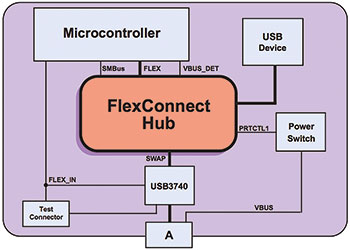
The software on the microcontroller may not be able to fully test all the connected devices and an automated test system could significantly reduce costs. It may thus be necessary to add internal test fixtures that would require the hub to change directions. FlexConnect lets the tester control the USB hub without any hardware changes to the USB system.
Requirements
There are various ways a USB host can transfer ownership of the bus to the device. When a hub is added, even more factors need to be considered to make sure all devices know what role they are meant to play.
The low-level signals involved are: Vbus, generally 5 V and supplied by the host; DP, where the host has 15 kΩ pull-down and the device 15 kΩ pull-up to 3,3 V; DM, where the host has 15 kΩ pull-down; ID, which is an option used in OTG (on the go) applications and is pulled up by the OTG enabled device; and the GND common reference.
There are two ways a port can change from a host to a device. First, the processor can dynamically change whether an exposed port acts as a host or a device through low-level software commands. If the host sends a special command to the device to change directions, the software will also execute the low-level direction change. In the OTG specification, this is known as the host navigation protocol (HNP). With this internal method, the host maintains the Vbus voltage supply after it has switched roles to act as a device.
Secondly, the ID pin can be used to signal the USB port on whether it should act as a host or device. The device enables a weak pull-up resistor on the ID pin and then monitors the state of the pin. If the ID pin is high, the device checks for the presence of a host by monitoring Vbus and, if found, acts as a device. If the ID pin is low, the device drives 5 V on Vbus and acts as a host.
This used to be done through the wiring of the USB cables. A Micro-A connector would short ID to GND and have a standard B plug at the other end of the cable. A Micro-B connector would float ID and have a standard A plug on the other end. An intelligent USB system could change the state of the ID pin, thus changing the host and device roles of the OTG ports.
If the internal role reversal command is used to change directions, the control of the USB bus passes to the new host. This means the original system is at the mercy of the software of the new host. The original system can, however, take back control by removing Vbus. If the new host suspends the original system, it will stop sending start-of-frame packets (SoFs) and the system should enter a low-power state. However, the SoFs will also cease if the new host is disconnected entirely.
If the external role reversal procedure is used, the Vbus and ID states should be monitored. To determine if the new host was disconnected, Vbus would be removed. If the new host wants to pass control back to the original system, the ID pin would be connected to ground.
Enabling FlexConnect
There are three ways to enable FlexConnect – through the SMBus, by driving a digital pin high, or through a custom setup packet to the hub controller. There are also various high-level ways of using the technology, such as with OTG.
Although the USB hub is not fully compliant with OTG, a system can take advantage of some of the OTG features to implement a dynamic change in direction. Many processors have OTG-capable USB ports but only one USB device is supported per port and a hub is needed to expand the number of devices. The ID pin is used to determine the direction. The OTG connections are shown in Figure 2.
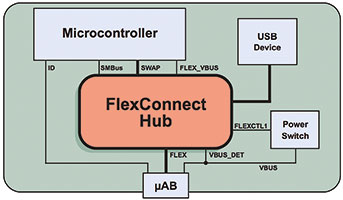
When a Micro-B connector is inserted into the socket, the ID pin is left floating and is sampled high by the microcontroller, which communicates to the hub through SMBus to determine the state of the Vbus DET pin. When ID and Vbus DET are both high, a USB host has been detected on the exposed connector and the OTG port of the microcontroller must be configured as a device.
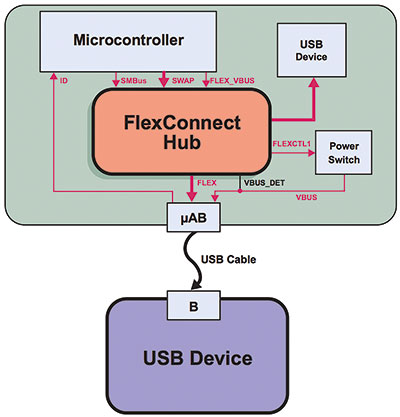
When a Micro-A connector is inserted into the socket, the ID pin is shorted to GND and is sampled low by the microcontroller. A USB device detected on the exposed connector means the OTG port of the microcontroller must be configured as a host. Figure 3 shows the data flow when connected to a USB device.
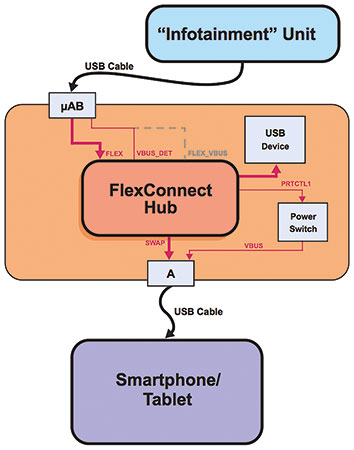
FlexConnect can also be implemented with portable devices that receive their power from an accessory that they will later allow the device to control. For example, a smartphone can be plugged into an automotive console to charge the battery but later the user may want to use the smartphone interface to play music. In this case, the infotainment unit must send a USB command to the hub and the smartphone to initiate the change in control.
The USB system is configured and can function independently. The downstream port of the hub has battery charging enabled and will enumerate the other downstream ports. When the smartphone is connected, it detects the Vbus voltage and battery charging handshake and starts charging. The infotainment unit enumerates and controls the device. It can then pass control of the hub to the smartphone if the user wants to use its interface. The data flow is shown in Figure 4.
Conclusion
Modern electronics systems require more of the USB than ever before. With the FlexConnect feature, designers can develop more advanced systems because it allows the hub to change the direction of the data flow.
| Email: | [email protected] |
| www: | |
| Articles: | More information and articles about Tempe Technologies |






© Technews Publishing (Pty) Ltd | All Rights Reserved
 printer friendly version